
终极笔记应用程序Alexandrie
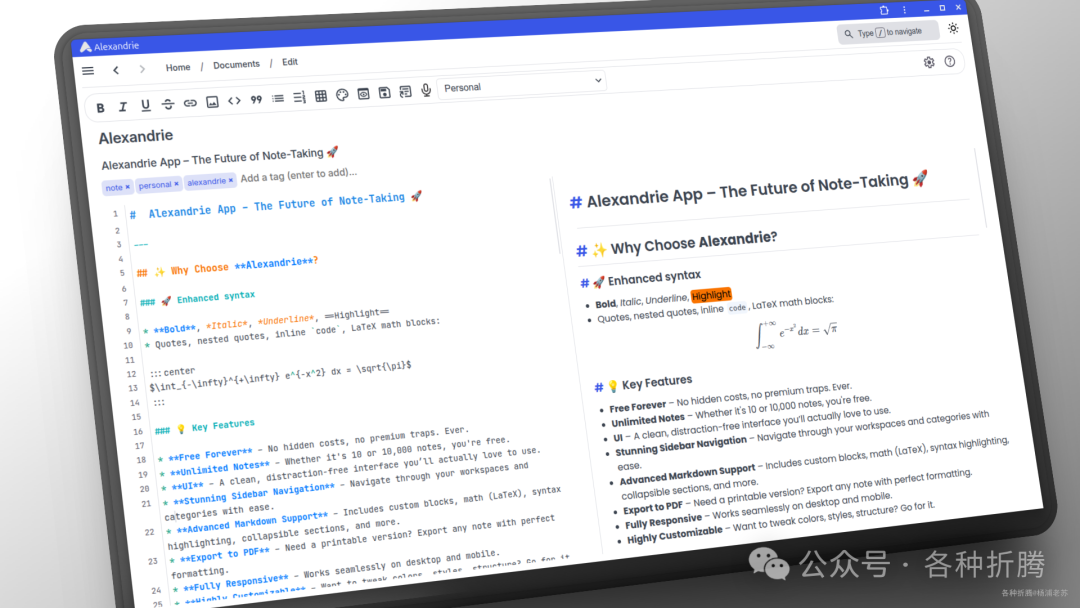
简介
什么是 Alexandrie ?
Alexandrie是一个快速、开源的Markdown笔记应用程序,专为学生和创作者设计。它提供了一个现代而优雅的界面,用于使用扩展的Markdown编写笔记,并支持直观的组织、搜索和导出功能。
主要特点
-
增强型 Markdown 编辑器: 具有高级和独特的
Markdown功能。 -
即时搜索: 快速查找笔记。
-
直观的组织: 通过完整的侧边栏、工作区、类别、嵌套文档/类别、标签等轻松分类和归档笔记。
-
导出与打印: 将笔记保存为
PDF、Markdown等格式。 -
随时随地访问: 可从任何设备登录并检索笔记,支持
PWA离线访问。 -
共享笔记: 通过唯一链接或强大的权限系统与他人共享笔记。
应用场景
-
学生用于学习笔记和资料整理。
-
创作者用于内容创作、知识管理和项目记录。
-
任何需要高效
Markdown笔记和组织功能的用户。

Alexandrie 是一个功能强大且用户友好的笔记应用,适合各种用户需求,尤其是在学习和创作方面提供了优越的支持。
安装
在群晖上以 Docker 方式安装。
采用 docker-compose 安装,将下面的内容保存为 docker-compose.yml 文件
# Docker Compose configuration for Alexandrie application stack
# This setup includes:
# - MySQL Database
# - RustFS Object Storage (S3 compatible)
# - Alexandrie Backend
# - Alexandrie Frontend

# For details please refer to the documentation (./docs/setup.md)

services:
# MySQL Database
mysql:
    image: mysql:8.0
    container_name: alexandrie-mysql
    restart: unless-stopped
    environment:
      MYSQL_ROOT_PASSWORD: rootpassword
      MYSQL_DATABASE: alexandrie
      MYSQL_USER: alexandrie
      MYSQL_PASSWORD: password
    volumes:
      - ./mysql_data:/var/lib/mysql
    # ports:
    #   - '3307:3306'
    healthcheck:
      test: ['CMD','mysqladmin','ping','-h','localhost']
      timeout: 10s
      retries: 5
      start_period: 30s

# Object Storage (RustFS, S3 compatible)
rustfs:
    image: rustfs/rustfs:latest
    container_name: alexandrie-rustfs
    restart: unless-stopped
    environment:
      RUSTFS_ACCESS_KEY: alexandrie-key
      RUSTFS_SECRET_KEY: alexandrie-secret
      RUSTFS_CONSOLE_ENABLE: 'false'# Disable web console
      RUSTFS_LOG_LEVEL: info
    # ports:
    #   - '9000:9000'
    volumes:
      - ./rustfs_data:/data
      - ./rustfs_logs:/logs
    healthcheck:
      test: ['CMD-SHELL','nc -z localhost 9000 || exit 1']
      interval: 30s
      timeout: 10s
      retries: 3
      start_period: 20s

# Alexandrie Backend
backend:
    image: ghcr.io/smaug6739/alexandrie-backend:latest
    container_name: alexandrie-backend
    environment:
      # General configuration
      BACKEND_PORT: 8201
      GIN_MODE: release# Set to 'release' for production, 'debug' for development

      # Database Configuration
      DATABASE_HOST: mysql
      DATABASE_PORT: 3306
      DATABASE_NAME: alexandrie
      DATABASE_USER: alexandrie
      DATABASE_PASSWORD: password

      # Object storage configuration (S3 compatible like RustFS, MinIO, etc.)
      # OPTIONAL: If you don't want to use the CDN feature you can leave these variables empty
MINIO_ENDPOINT: rustfs:9000
MINIO_ACCESSKEY: alexandrie-key
MINIO_SECRETKEY: alexandrie-secret
MINIO_BUCKET: alexandrie
# SMTP Configuration (only for password reset emails)
# OPTIONAL: If you don't want to use email features, you can leave these variables empty
SMTP_HOST: ''
SMTP_MAIL: ''
SMTP_PASSWORD: ''
# Application authentication and security
JWT_SECRET: your-secure-jwt-secret-key-change-this-in-production# Change this secret in production!
FRONTEND_URL: http://192.168.0.197:8200# URL where the frontend is hosted
ALLOW_UNSECURE: 'true'# Set to 'true' if you run without HTTPS (e.g., local dev);
ports:
- '8201:8201'
depends_on:
mysql:
condition: service_healthy
rustfs:
condition: service_healthy
# Alexandrie Frontend
frontend:
image: ghcr.io/smaug6739/alexandrie-frontend:latest
container_name: alexandrie-frontend
restart: unless-stopped
environment:
PORT: 8200
# Runtime configuration - builds with these values at startup
NUXT_PUBLIC_BASE_API: http://192.168.0.197:8201
NUXT_PUBLIC_BASE_CDN: http://192.168.0.197:9000/alexandrie
NUXT_PUBLIC_BASE_URL: http://192.168.0.197:8200
ports:
- '8200:8200'
depends_on:
- backend关于环境变量的简单说明,其中 192.168.0.197 为群晖主机 IP,需要替换为你自己的主机 IP
mysql MYSQL_ROOT_PASSWORD 设置 MySQL 的根用户密码。
MYSQL_DATABASE 创建时自动生成的数据库名称。
MYSQL_USER 创建的 MySQL 用户名。
MYSQL_PASSWORD 创建的 MySQL 用户的密码。
rustfs RUSTFS_ACCESS_KEY RustFS 的访问密钥,用于认证访问对象存储。
RUSTFS_SECRET_KEY RustFS 的秘密密钥,用于认证访问对象存储。
RUSTFS_CONSOLE_ENABLE 是否启用 RustFS 的 web 控制台,设置为 false 表示禁用。
RUSTFS_LOG_LEVEL 设置 RustFS 的日志级别,通常为 info。
backend BACKEND_PORT 设置后端服务监听的端口。
GIN_MODE 设置 Gin 框架的运行模式,release 表示生产模式,debug 表示开发模式。
DATABASE_HOST MySQL 数据库的主机地址。
DATABASE_PORT MySQL 数据库的端口。
DATABASE_NAME MySQL 数据库名称。
DATABASE_USER MySQL 用户名。
DATABASE_PASSWORD MySQL 用户密码。
MINIO_ENDPOINT 对象存储的端点地址(如 RustFS 或 MinIO)。
MINIO_ACCESSKEY 对象存储的访问密钥。
MINIO_SECRETKEY 对象存储的秘密密钥。
MINIO_BUCKET 对象存储中使用的桶名称。
SMTP_HOST SMTP 邮件服务器地址,用于发送密码重置邮件(可选)。
SMTP_MAIL SMTP 用户邮箱(可选)。
SMTP_PASSWORD SMTP 用户密码(可选)。
JWT_SECRET JWT 认证的秘密密钥,生产环境中应更改为安全的随机字符串。
FRONTEND_URL 前端应用的访问 URL。
ALLOW_UNSECURE 如果不使用 HTTPS,设置为 true 以允许不安全的连接(如本地开发时)。
frontend PORT 设置前端服务监听的端口。
NUXT_PUBLIC_BASE_API 前端访问后端 API 的基本 URL。
NUXT_PUBLIC_BASE_CDN 前端访问对象存储的基本 URL。
NUXT_PUBLIC_BASE_URL 前端应用的基本 URL。
然后通过 SSH 登录到您的群晖,执行下面的命令:
# 新建文件夹 alexandrie 和 子目录
mkdir -p /volume1/docker/alexandrie/{mysql_data,rustfs_data,rustfs_logs}

# 进入 alexandrie 目录
cd /volume1/docker/alexandrie

# 将 docker-compose.yml 放入当前目录

# 一键启动
docker-compose up -d 
运行
在浏览器中输入 http://群晖IP:8200 就能看到应用介绍界面

点 Get Started 进入登录界面
如果是第一次,需要先注册用户

登录成功后的主界面

虽然不支持中文,但使用还是很简单的

效果看起来也挺不错

参考文档
Smaug6739/Alexandrie: A fast, open-source Markdown note-taking app for students and creators 地址:https://github.com/Smaug6739/Alexandrie
@所有人:写文不易,如果你都看到了这里,请点个赞和在看,分享给更多的朋友;为确保你能收到每一篇文章,请主页右上角设置星标。